



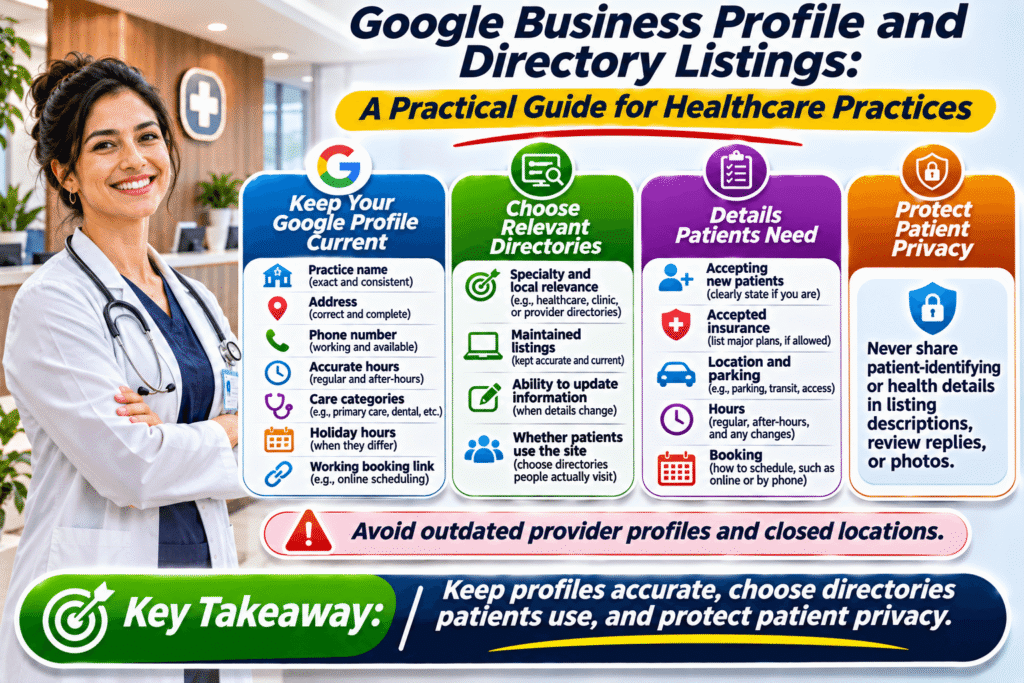
Google Business Profile and Directory Listings: A Practical Guide for Healthcare Practices
A parent searching for a pediatric clinic on a Sunday evening does not want to read ten websites. They want to know which offices are nearby, which ones accept new patients, and whether anyone can see their child tomorrow morning. Much of that decision happens on a map listing or directory profile before they ever reach a practice’s website.
For clinics, dental offices, therapy practices, and home care providers, those profiles often act as the first point of contact.
Treat Your Google Business Profile Like a Front Desk
Your Google Business Profile is often the first thing patients see when they search for a provider nearby. Make sure it shows the correct practice name, address, phone number, hours, and the categories that best describe the care you provide. Add holiday hours ahead of time, and keep your booking link working.
Google’s guidelines for representing your business ask businesses to appear online the way they appear in the real world, so avoid adding keywords or locations to your practice name. Group practices should also review how individual practitioners are listed, since outdated profiles for former providers can confuse patients.
Choosing Which Directories Are Worth Your Time
Healthcare practices appear on many sites, from insurance networks and health systems to specialty directories and general local directories. You don’t need to be everywhere. Before you create or claim a listing, ask a few questions:
- Is the site relevant to your specialty or your local area?
- Does it look maintained, with current listings and working pages?
- Can you control and update your own information?
- Would a real patient plausibly use it to find a provider?
General directories can still be useful when they organize listings clearly. Dir Bull groups providers such as home care agencies, pediatric clinics, and therapy practices in its Healthcare category, giving patients one more place to compare local options by type of care.
Mistakes That Frustrate Patients
The most common problems are simple ones: phone numbers that route to a closed office, hours that ignore lunch closures, missing information about accepted insurance, and listings for locations that have closed. Each one costs trust and can cost appointments. Never include protected health information or identifiable patient details in listing descriptions, review replies, or photos.
Make Choosing Your Practice Easy
Accurate listings won’t guarantee new patients or better rankings, but they make it easier for people to choose your practice with confidence. Keep your Google Business Profile current, choose directories that patients actually use, and check every profile, including your Dir Bull listing, whenever hours, providers, or locations change.
Frequently Asked Questions
Should each doctor in our practice have a separate Google Business Profile?
Google allows individual practitioner profiles in some situations, but the rules depend on how your practice is set up. Review Google’s current guidelines before creating new profiles. Whatever you decide, make sure listings for providers who have left are updated or marked appropriately, so patients aren’t directed to someone who no longer practices there.
Can we reply to patient reviews online?
Yes, but carefully. Thank reviewers in general terms and invite them to contact the office directly about specific concerns. Never confirm that a reviewer is a patient, mention their treatment, or share health details, even if they disclosed them first. Many practices use a standard, privacy-safe reply template reviewed by their compliance contact.
How many directory listings does a medical practice need?
There is no ideal number. Focus first on your Google Business Profile and the platforms patients in your specialty commonly use, such as insurance network directories. Add general local directories when they are well maintained and relevant. A smaller set of accurate, complete listings is easier to manage and more helpful than many outdated ones.
What information matters most to new patients?
New patients usually want to know whether you are accepting new patients, which insurance plans you take, where you are and where to park, your hours, and how to book. Make those details easy to find on your website and listings. Clear answers to these practical questions often matter more to a first-time visitor than long marketing copy.

Dir Bull Editorial Team
We help local customers find the best businesses in their area and help those businesses grow.
Related Posts
 19Nov
Why HVAC Companies Should Audit Their Business Information Before Peak Season
A wrong phone number or outdated hours costs the most when demand spikes. Here is a simple pre-season checklist for heating and cooling companies.
Read More 17Nov
Citation Consistency for Contractors: Small NAP Errors That Cost You Calls
Three addresses for one remodeling company make customers hesitate. Learn what business citations are and how to clean them up step by step.
Read More